
Typography
This section allows you to control the fonts and text sizes across your store. By customizing heading and body typography, you can create a clear visual hierarchy and ensure a consistent reading experience.
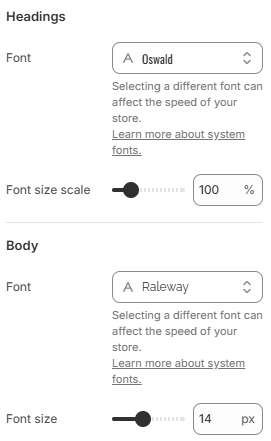
- Headings font: Select the font used for all headings and titles across the store.
- Headings font size scale: Adjust the overall size of headings proportionally. Increasing the value makes headings more prominent, while decreasing it creates a more compact layout.
- Body font: Choose the font used for paragraphs and general content.
- Body font size: Set the base font size for body text, affecting readability across all pages.
For the best results, use a clean and readable font combination with a clear contrast between headings and body text. Keep font sizes balanced (typically 14–16px for body text) and avoid using too many different fonts to maintain a consistent and professional look.