
Newsletter popup
This section allows you to configure a popup that encourages visitors to subscribe to your newsletter. It helps you capture emails, promote offers, and build long-term customer engagement.
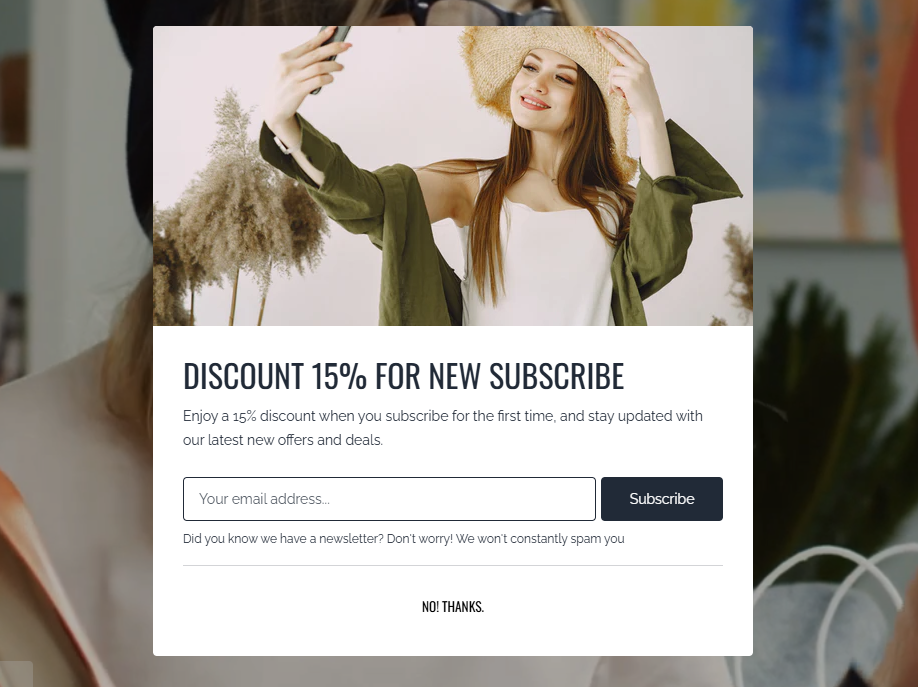
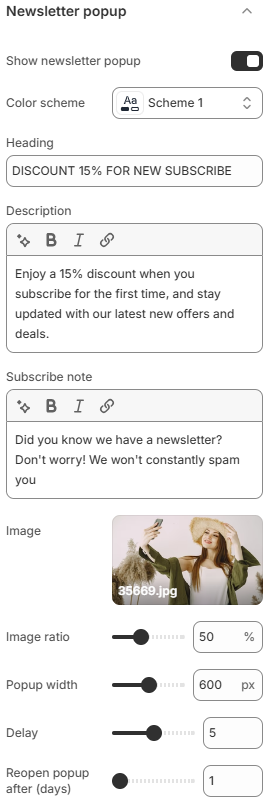
- Show newsletter popup: Enable or disable the newsletter popup on your store.
- Color scheme: Select the color scheme applied to the popup.
- Heading: Set the main title displayed in the popup.
- Description: Add a short description to provide more context or highlight benefits.
- Subscribe note: Display a small note below the subscription field (e.g., privacy message or incentive).
- Image: Upload an image to enhance the visual appearance of the popup.
- Image ratio: Define the aspect ratio (height divided by width) of the image.
- Popup width: Adjust the width of the popup.
- Delay: Set the time delay before the popup appears after a user visits the site.
- Reopen popup after (days): Control how many days before the popup is shown again to the same visitor after being closed.
Use the newsletter popup strategically to avoid disrupting the user experience. A well-timed popup with a clear message and incentive (such as a discount or exclusive offer) can significantly improve subscription rates. Adjust delay and reopen timing carefully to balance visibility and usability.