
Video live
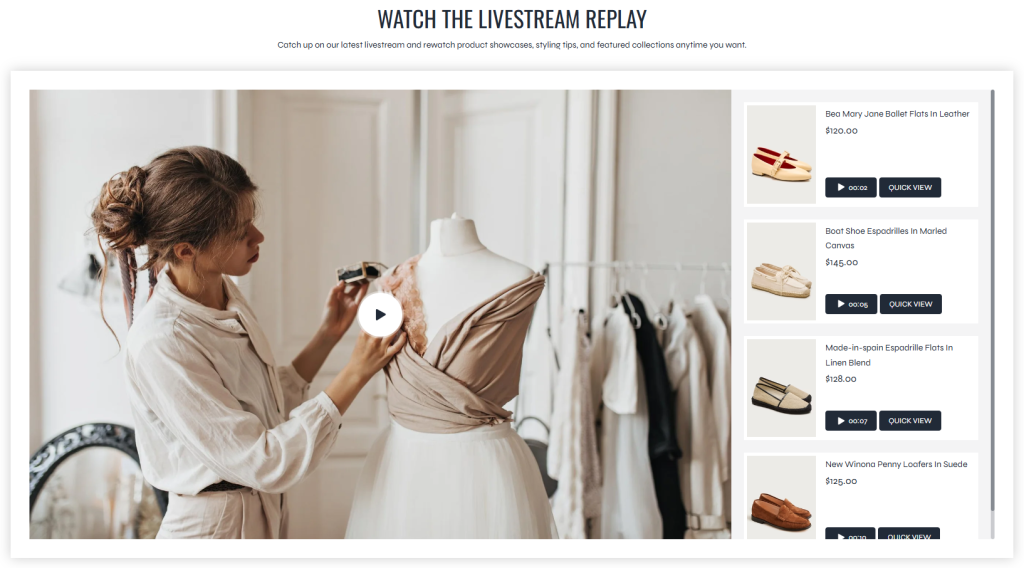
The Video Live section allows merchants to display livestream replays or promotional product videos together with a synchronized product timeline. Products can be linked to specific timestamps inside the video, helping customers quickly navigate to the exact moment where a product appears.
This section is especially useful for livestream shopping experiences, product showcases, fashion presentations, or replay content where multiple featured products appear throughout the video. By combining video playback with timestamp-based product navigation, customers can easily discover and revisit products shown during the stream.
Each product displayed in the synchronized product list is managed using a separate section block.
Settings
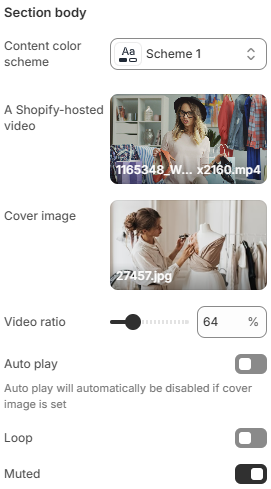
- Content color scheme: Controls the color styling used for the section content and product list area.
- A Shopify-hosted video: Selects the Shopify-hosted video displayed inside the section.
- Cover image: Uploads a cover image displayed before the video starts playing.
- Video ratio: Controls the aspect ratio used for the video container.
- Auto play: Automatically starts video playback when the section becomes visible. Auto play is automatically disabled when a cover image is used.
- Loop: Continuously replays the video automatically when enabled.
- Muted: Plays the video without sound when enabled.
Block: Product
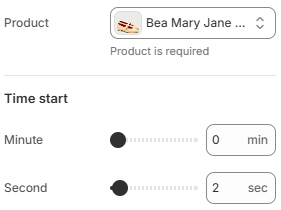
- Product: Selects the product associated with the video timestamp.
- Minute: Defines the starting minute of the product appearance inside the video.
- Second: Defines the starting second of the product appearance inside the video.
Using accurate timestamps, high-quality livestream videos, and properly organized featured products can help create a more interactive shopping experience while making it easier for customers to discover products directly from video content.