
Marquee text
The Marquee Text section displays continuously scrolling text content across the storefront, helping merchants create eye-catching announcements, promotional messages, brand slogans, or navigation links in a more dynamic format. This section is ideal for increasing visibility of important content while adding movement and interactivity to the storefront design.
Each scrolling text item inside the marquee is created using a section block, allowing merchants to display multiple text entries with optional links.

Settings
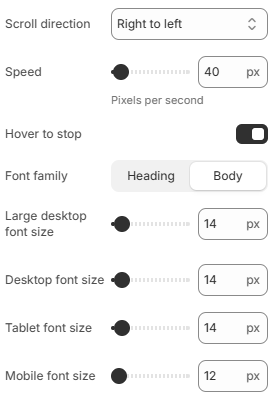
- Scroll direction: Controls the marquee scrolling direction. Available options include Left to Right and Right to Left.
- Speed: Controls the scrolling speed in pixels per second.
- Hover to stop: Pauses the marquee animation when customers hover over the section.
- Font family: Defines whether the marquee text uses the heading font style or body font style.
- Large desktop font size: Controls the marquee text size displayed on large desktop screens.
- Desktop font size: Defines the marquee text size for desktop devices.
- Tablet font size: Adjusts the marquee text size displayed on tablet devices.
- Mobile font size: Controls the marquee text size displayed on mobile devices for better responsiveness.
Block: Item
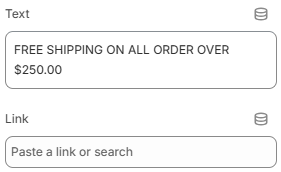
- Text: Defines the text content displayed inside the marquee item.
- Link: Sets the destination URL for the marquee text item.
Using concise text content, balanced scrolling speeds, and responsive typography can help create a cleaner and more engaging marquee experience across all devices. Linking marquee items to important collections, campaigns, or pages can also help improve customer interaction and storefront navigation.