
Email signup banner
The Email Signup Banner section is designed specifically for the password page, allowing merchants to collect customer email subscriptions before the storefront officially launches. This section helps build anticipation for upcoming store openings, product launches, or special campaigns while keeping visitors informed about when the website will become available.
The section also supports a countdown timer, giving customers a clear indication of the remaining time before the store goes live.
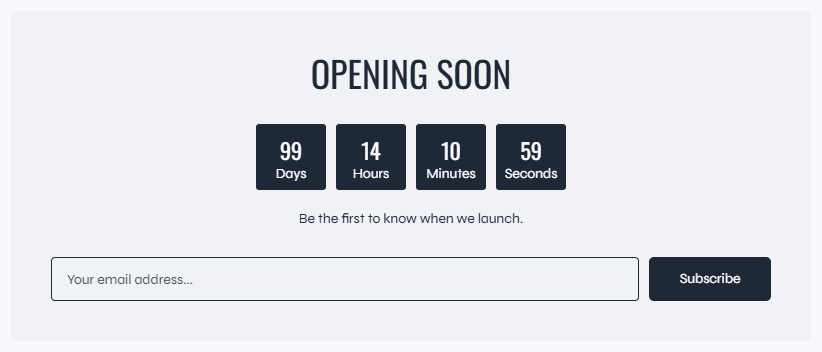
The Email Signup Banner section supports flexible content blocks, allowing merchants to customize the appearance and messaging displayed on the password page.
Block: Heading
The Heading block displays the main title or announcement message inside the email signup banner.
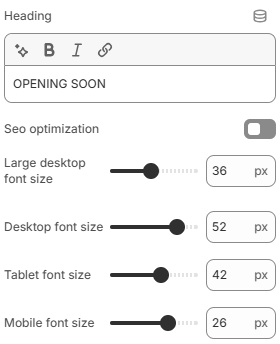
- Heading: Defines the heading text displayed inside the section.
- SEO optimization: When enabled, the heading will use an H1 tag. Otherwise, the heading uses an H2 tag.
- Large desktop font size: Controls the heading font size displayed on large desktop screens.
- Desktop font size: Defines the heading font size for desktop devices.
- Tablet font size: Adjusts the heading font size displayed on tablet devices.
- Mobile font size: Controls the heading font size displayed on mobile devices for better responsiveness.
Block: Countdown
The Countdown block displays a live countdown timer showing when the storefront or campaign will officially launch.
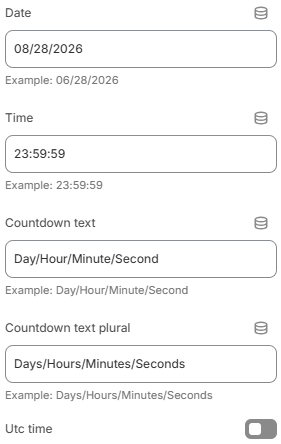
- Date: Defines the countdown target date using the format
MM/DD/YYYY. Example:06/28/2026. - Time: Defines the countdown target time using the format
HH:MM:SS. Example:23:59:59. - Countdown text: Defines the singular countdown labels. Example:
Day/Hour/Minute/Second. - Countdown text plural: Defines the plural countdown labels. Example:
Days/Hours/Minutes/Seconds. - Utc time: Enables UTC timezone calculation for the countdown timer.
Block: Text
The Text block allows merchants to display additional descriptive content inside the Email Signup Banner section. This block is commonly used for launch announcements, promotional messages, store introductions, or subscription encouragement text.
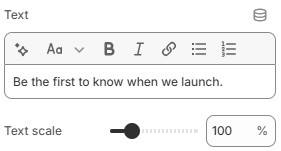
- Text: Defines the text content displayed inside the block.
- Text scale: Controls the overall text size and visual emphasis.
Block: Email form
The Email Form block displays a newsletter subscription form, allowing customers to submit their email addresses directly from the password page before the storefront officially launches.
Block: Spacing
The Spacing block allows merchants to add adjustable spacing between content blocks inside the section, helping create cleaner and more organized layouts across different screen sizes.
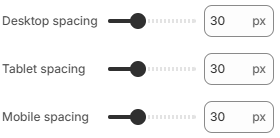
- Desktop spacing: Controls the spacing size displayed on desktop devices.
- Tablet spacing: Adjusts the spacing size for tablet layouts.
- Mobile spacing: Defines the spacing size displayed on mobile devices.
Using balanced spacing, clear messaging, and concise subscription content can help create a more visually organized password page while encouraging customers to subscribe before launch day.