
Viewed products
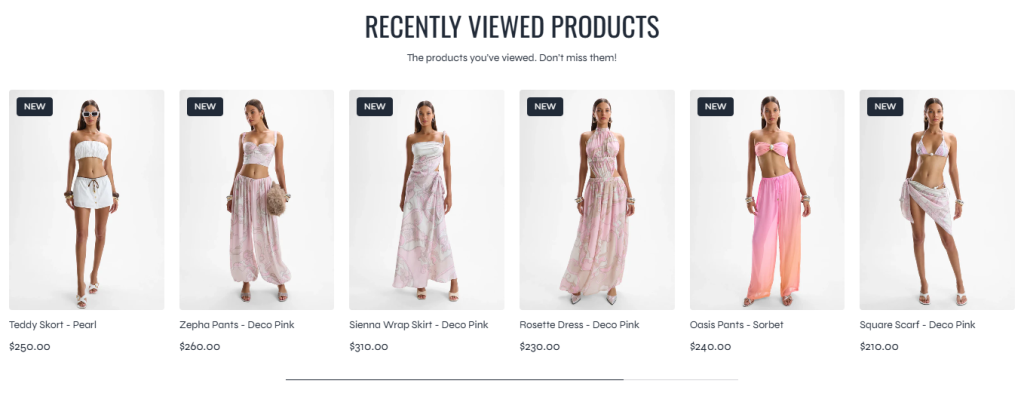
The Viewed Products section displays products that customers have recently viewed on the storefront. This section helps improve product rediscovery by allowing customers to quickly return to products they previously explored, creating a smoother and more convenient shopping experience.
The section supports both grid and carousel layouts, making it flexible for different storefront designs and responsive across all device sizes.
Settings
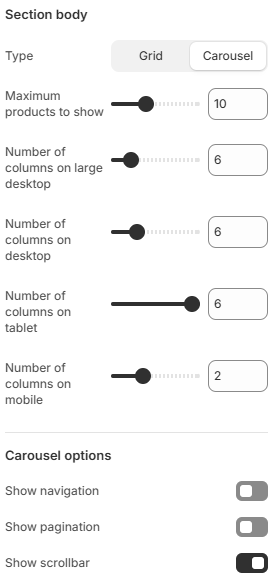
- Type: Controls the product display layout. Available options include Grid and Carousel.
- Maximum products to show: Limits the total number of recently viewed products displayed inside the section.
- Number of columns on large desktop: Defines how many product columns are displayed on very large desktop screens.
- Number of columns on desktop: Controls the product grid layout on desktop devices.
- Number of columns on tablet: Adjusts the product layout for tablet devices.
- Number of columns on mobile: Defines the number of product columns displayed on mobile devices.
- Carousel Options
These settings are only applied when the Carousel layout is selected.
Show navigation: Displays previous and next navigation buttons for carousel control.
Show pagination: Displays pagination indicators showing the current carousel position.
Show scrollbar: Enables a scrollbar indicator for the product carousel.
Using responsive layouts, balanced product spacing, and appropriate carousel controls can help create a more user-friendly browsing experience while making recently viewed products easier for customers to revisit.