
Search behavior
This section allows you to control how the search feature behaves and what information is displayed in search results and suggestions. It helps improve product discovery and enhances the overall user experience.
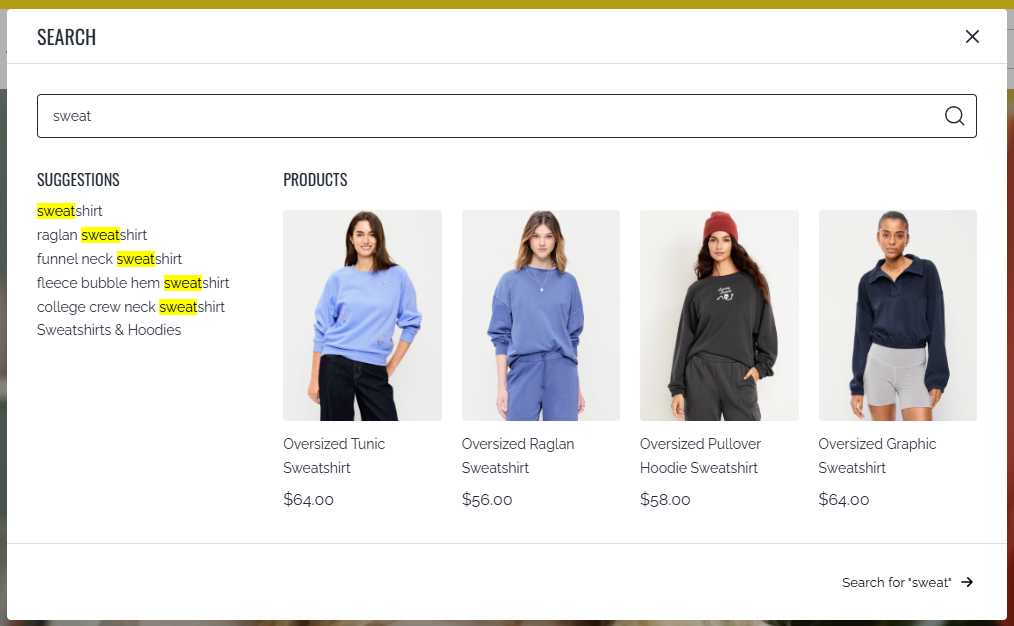
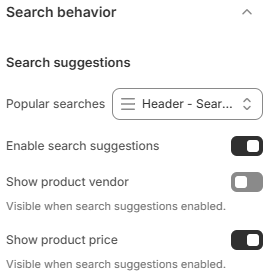
- Popular searches: Display a list of trending or frequently searched keywords. You can configure this by creating a menu with corresponding search terms, helping users quickly access popular queries.
- Enable search suggestions: When enabled, the search bar will show real-time suggestions as users type, making it easier to find relevant products faster.
- Show product vendor: Display the product vendor/brand name in search results and suggestions.
- Show product price: Display product pricing information in search results and suggestions.
Optimizing search behavior can significantly improve product discovery and conversion rates. Showing suggestions and relevant product details like price or vendor helps users make quicker decisions. Using popular searches also guides users toward high-interest products, increasing engagement and sales opportunities.