
Badges
This section allows you to configure product badges such as New, Sale, and Sold Out. These badges help highlight product status and attract customer attention on product cards.
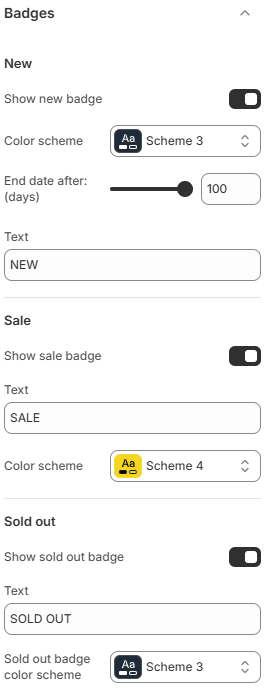
New
- Show new badge: Enable or disable the “New” badge for recently added products.
- Color scheme: Select the color scheme used for the New badge.
- End date after (days): Define how many days a product is considered “new” after being published.
- Text: Customize the label text displayed on the badge.
Sale
- Show sale badge: Enable or disable the Sale badge for discounted products.
- Color scheme: Select the color scheme used for the Sale badge.
- Text: Customize the label text displayed on the badge.
Sold Out
- Show sold out badge: Enable or disable the Sold Out badge when a product is out of stock.
- Sold out badge color scheme: Select the color scheme used for the Sold Out badge.
- Text: Customize the label text displayed on the badge.
Use clear and concise badge text to quickly communicate product status. Choose contrasting colors to ensure badges stand out without clashing with your overall design. Avoid enabling too many badges at once to keep product cards clean and easy to scan.