Page title
The Page Title settings allow merchants to customize the appearance of page headings across the storefront. With flexible typography, spacing, alignment, and style controls, this section helps create visually consistent page headers that match the overall branding and improve content readability on all devices.
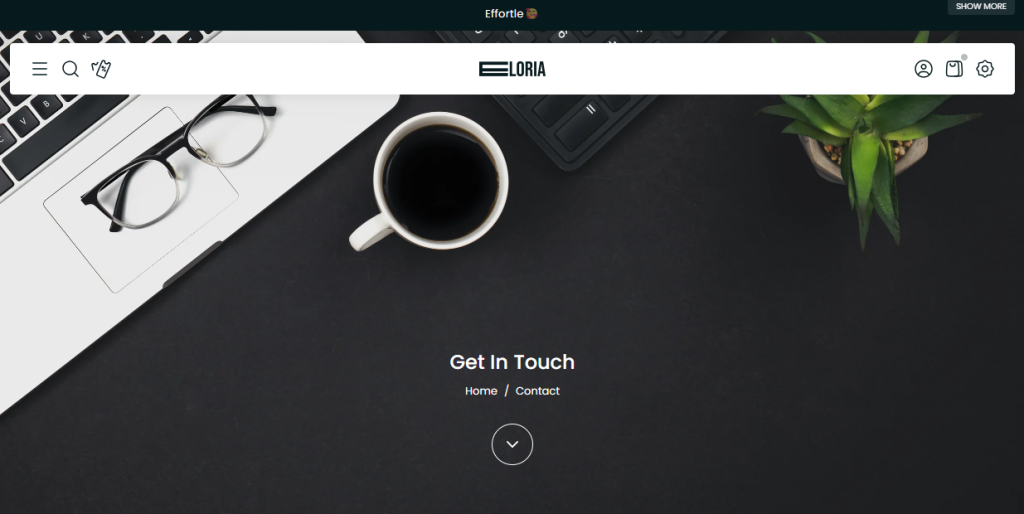
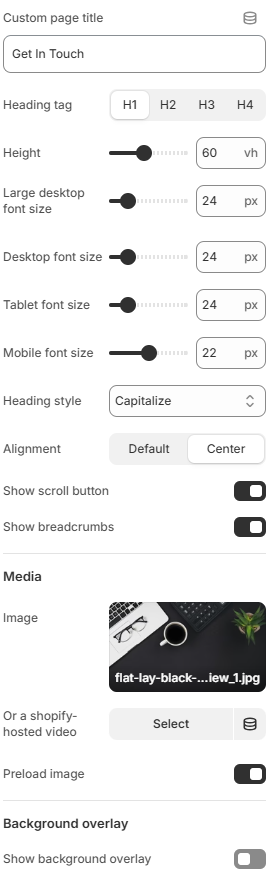
- Custom page title: Set a custom title for the page title section.
- Heading tag: Select the HTML heading tag used for the page title, from H1 to H4.
- Height: Set the height of the page title section in viewport height (vh).
- Large desktop font size: Set the font size for the page title on large desktop screens.
- Desktop font size: Set the font size for the page title on desktop screens.
- Tablet font size: Set the font size for the page title on tablet devices.
- Mobile font size: Set the font size for the page title on mobile devices.
- Heading style: Select the text transformation style for the page title, such as Capitalize.
- Alignment: Set the horizontal alignment of the page title.
- Show scroll button: Enable or disable the scroll button displayed within the page title section.
- Show breadcrumbs: Enable or disable breadcrumb navigation in the page title section.
Media
- Image: Select an image to display as the background or visual media of the page title section.
- Or a Shopify-hosted video: Select a Shopify-hosted video to use instead of an image.
- Preload image: Enable or disable preloading of the section image to improve image loading priority.
Background overlay
- Show background overlay: Enable or disable an overlay layer over the background media, helping improve the readability of the page title content.
Using balanced font sizes, appropriate spacing, and consistent heading styles can help create a cleaner and more professional page layout while maintaining good readability across different screen sizes.