Marquee product
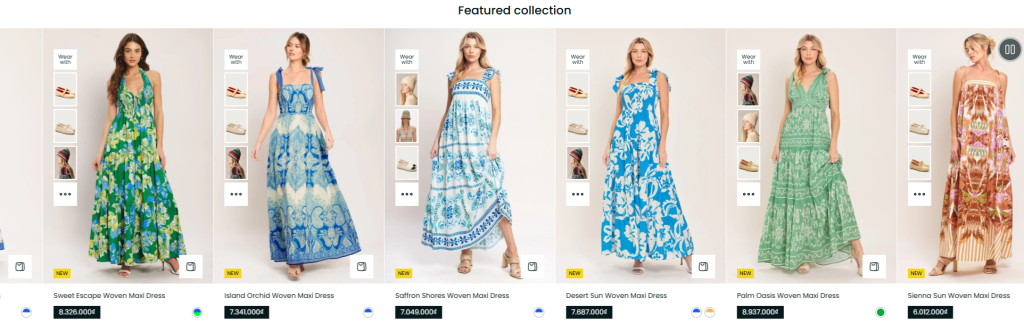
The Marquee Product section displays products from a selected collection inside a continuously scrolling marquee layout. This section is ideal for showcasing featured products, trending items, new arrivals, or promotional collections in a more dynamic and attention-grabbing format.
With customizable scrolling direction, speed controls, and optional marquee text, the section helps create a modern storefront experience while improving product visibility and customer engagement.
Settings
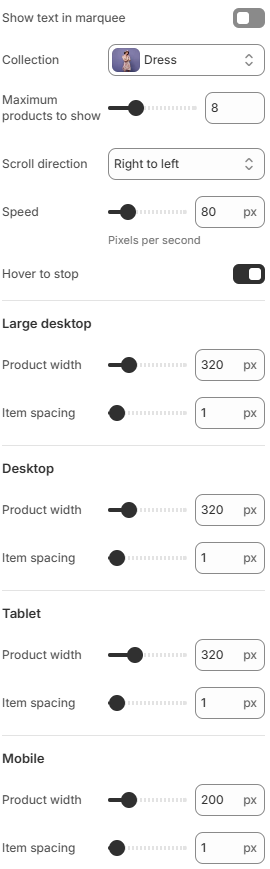
- Show text in marquee: Displays custom text inside the marquee product area, typically used as a title or promotional label.
- Collection: Select the product collection to display in the marquee.
- Maximum products to show: Set the maximum number of products displayed in the marquee.
- Scroll direction: Choose the direction in which the products move, such as right to left.
- Speed: Set the scrolling speed of the marquee in pixels per second.
- Hover to stop: Enable or disable pausing the marquee animation when the customer hovers over it.
- Product width: Adjust the width of each product item independently for large desktop, desktop, tablet, and mobile screen sizes.
- Item spacing: Adjust the spacing between product items independently for large desktop, desktop, tablet, and mobile screen sizes.
Using balanced scrolling speeds, concise marquee text, and carefully selected product collections can help create a smoother browsing experience while keeping featured products more noticeable throughout the storefront.