Shopify INP Optimization: How to Improve Interaction Speed and Core Web Vitals
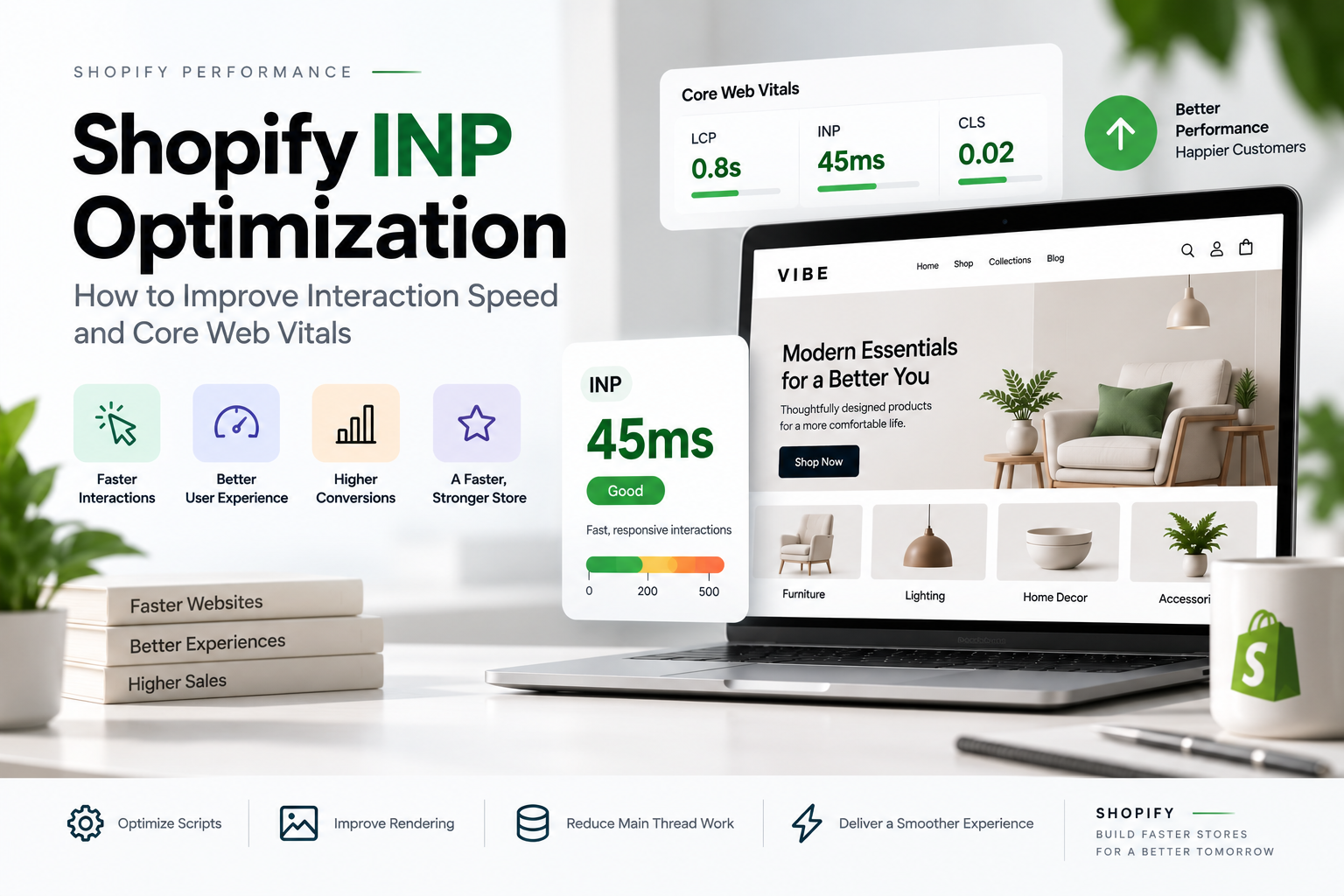
Shopify INP optimization helps make a Shopify store feel faster and more responsive when customers interact with it. A store can load quickly and still feel slow if buttons, menus, filters, search, variant selectors, or cart interactions take too long to respond.
Interaction to Next Paint (INP) is an important part of Core Web Vitals because it focuses on how quickly the browser responds to user interactions. For Shopify merchants and theme developers, improving INP often means looking closely at JavaScript, third-party apps, event handlers, DOM complexity, and the way interactive features are loaded.
The good news is that many INP problems can be improved without rebuilding an entire Shopify store.
Table of contents
- What Is INP in Shopify?
- Why Shopify INP Optimization Matters
- How INP Works
- Common Shopify INP Optimization Problems
- Reduce JavaScript for Better Shopify INP
- Load JavaScript Only When It Is Needed
- Audit Shopify Apps and Third-Party Scripts
- Use Defer and Async Correctly
- Optimize Event Handlers for Better INP
- Break Up Long JavaScript Tasks
- Optimize Product Variant Selection for Shopify INP
- Optimize the Cart Drawer
- Keep Mega Menus Lightweight
- Reduce DOM Complexity
- Avoid Unnecessary Rendering
- Reduce Stylesheet Complexity
- Be Careful With Custom Elements
- Do Not Confuse TBT With INP
- How to Find the Worst INP Interactions
- A Practical Shopify INP Optimization Workflow
- How INP Relates to LCP and CLS
- INP and Shopify Theme Architecture
- Can a Premium Shopify Theme Have Poor INP?
- When Custom Shopify Development Makes Sense
- Shopify INP Optimization Should Start With the Biggest Problems
- Final Thoughts
What Is INP in Shopify?
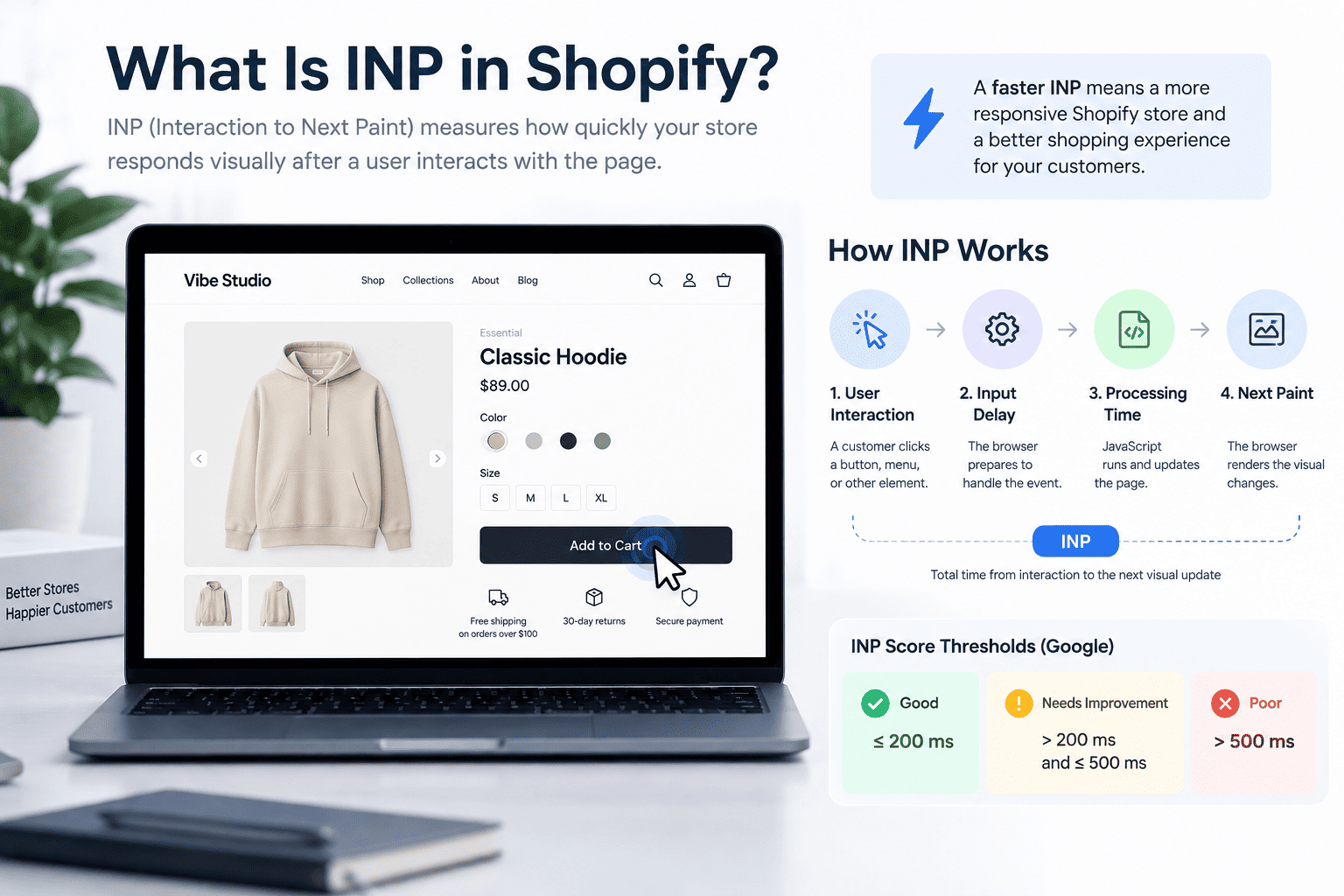
INP stands for Interaction to Next Paint. It measures how quickly a webpage responds visually after a user interacts with it.
Imagine a customer visiting a Shopify product page and clicking a variant button.
If the store responds immediately by updating the product image, price, availability, or selected state, the interaction feels fast.
If the customer clicks the button and nothing appears to happen for several hundred milliseconds, the store feels sluggish even if the initial page load was extremely fast.
INP became one of Google’s Core Web Vitals in March 2024, replacing First Input Delay (FID).
Unlike FID, which primarily measured the delay before an event handler started running, INP looks more broadly at interaction responsiveness and the time required for the browser to present the resulting visual update.
What Is a Good INP Score?
Google generally evaluates INP using three thresholds:
- Good: 200 milliseconds or less
- Needs improvement: more than 200 ms and up to 500 ms
- Poor: more than 500 ms
INP is evaluated using the 75th percentile of interaction data. This means a store needs to provide consistently responsive interactions rather than simply having a few fast interactions.
For ecommerce stores, this distinction matters. A page can have an excellent loading experience while still feeling slow when customers interact with it.
Why Shopify INP Optimization Matters
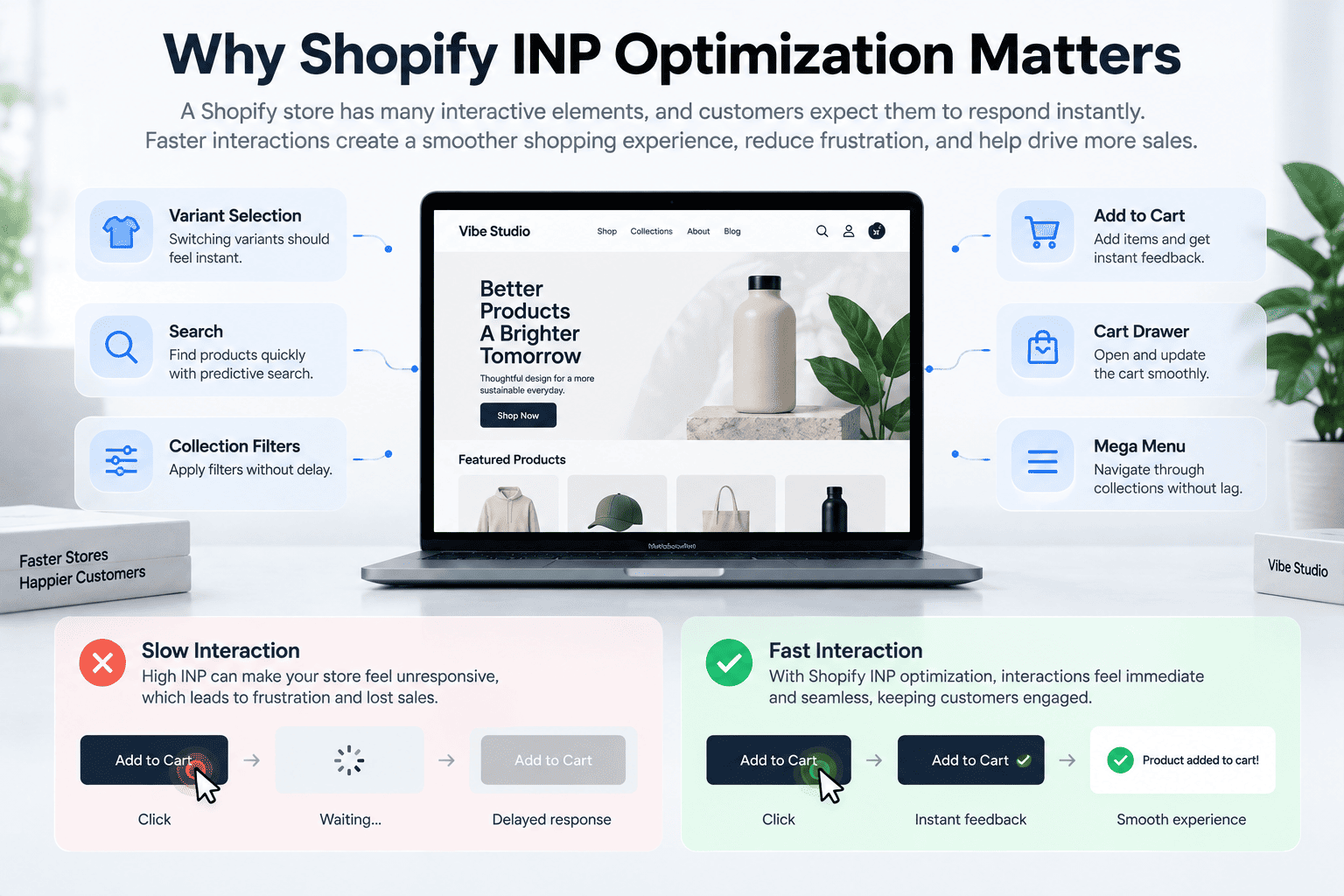
Shopify stores rely heavily on interactive elements.
Customers may need to:
- Select product variants
- Open a cart drawer
- Add products to the cart
- Open a mega menu
- Search for products
- Apply collection filters
- Change quantities
- Open quick views
- Select product options
- Interact with promotional popups
- Expand product information
- Use predictive search
Many of these interactions require JavaScript.
When too much JavaScript runs at the wrong time, the browser can become busy processing tasks instead of responding to the customer.
This creates a familiar ecommerce frustration: the customer clicks something, waits, and wonders whether the click actually registered.
For a Shopify theme, performance optimization should therefore not stop at LCP. LCP tells you how quickly important content appears, while INP tells you how responsive the store feels during interaction.
If you are working on broader theme performance, our guide to How to Reduce CLS in Shopify Stores covers another important Core Web Vital that affects the overall storefront experience.
How INP Works
An interaction can generally be understood as three stages:
- Input delay
- Processing time
- Presentation delay
Understanding these stages makes Shopify INP optimization much easier.
Input Delay
Input delay is the time between the customer’s interaction and the point where the browser can begin processing the relevant event.
Long-running JavaScript is a common cause.
For example, if a customer clicks a menu button while the browser is busy executing a large JavaScript task, the click may have to wait.
The button itself may be perfectly implemented. The problem is that something else is occupying the main thread.
Processing Time
Once the browser starts handling the interaction, the associated event handlers and JavaScript logic need to execute.
A variant selector might need to:
- Determine the selected variant
- Update the URL
- Change the product image
- Update the price
- Update availability
- Change the selected state
- Update selling plan information
- Trigger other components
If this logic is unnecessarily complex, processing time increases.
Presentation Delay
After JavaScript finishes processing, the browser still needs to render the resulting changes.
A large DOM, expensive style calculations, layout changes, or excessive rendering work can increase this part of the interaction.
This is why simply reducing the number of JavaScript files is not always enough.
A fast interaction requires the entire path from click to visible response to be efficient.
Common Shopify INP Optimization Problems
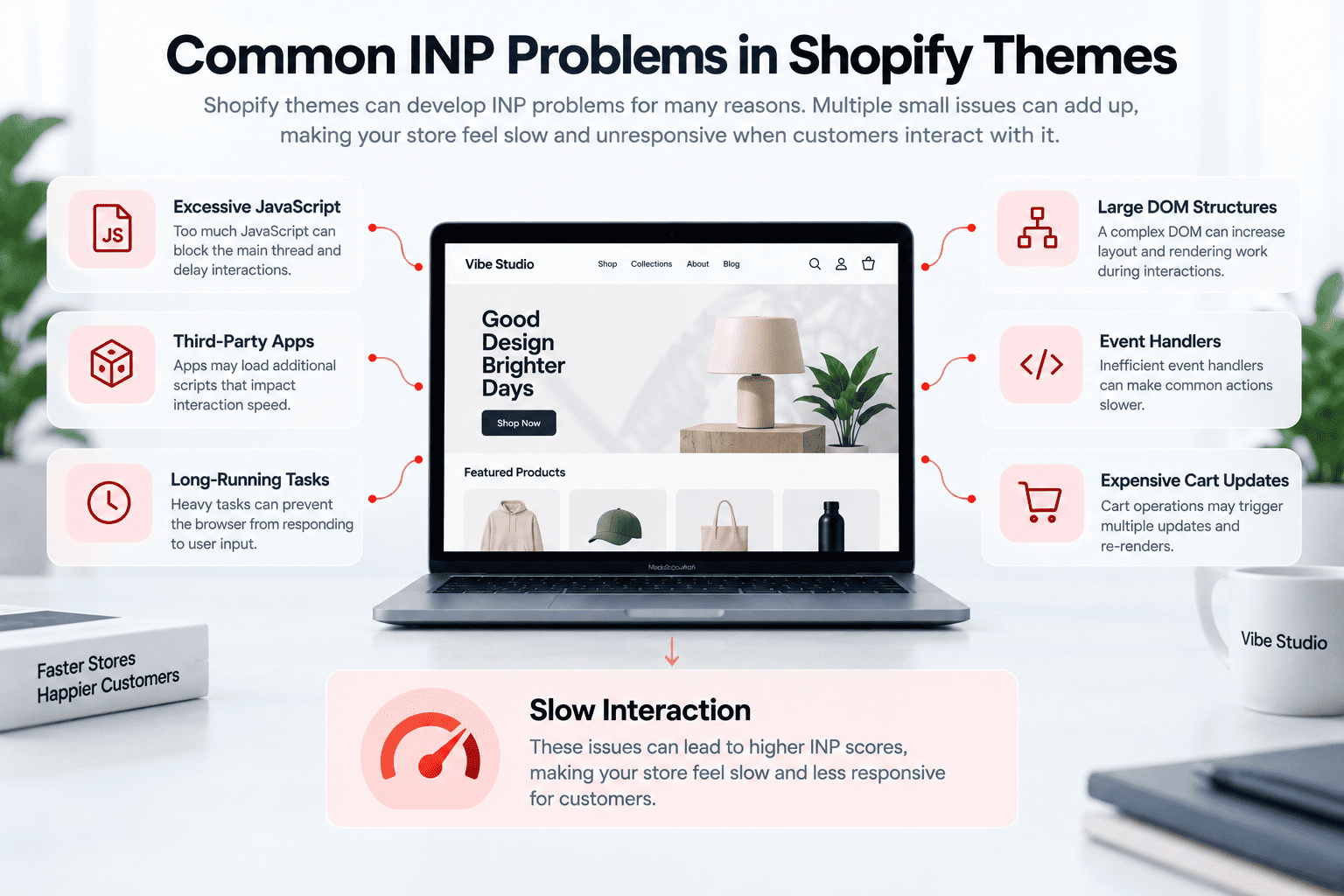
Shopify themes can develop INP problems for several reasons.
Some of the most common include:
- Excessive JavaScript
- Large JavaScript bundles
- Too many third-party scripts
- Heavy Shopify apps
- Long-running event handlers
- Complex product variant logic
- Expensive cart updates
- Large DOM structures
- Overly complex mega menus
- Unnecessary re-rendering
- Synchronous work during interactions
- JavaScript loaded before it is needed
The problem is often cumulative.
One small script may not cause a noticeable problem. Ten different scripts listening to page events can create a very different experience.
This is also why the architecture of your theme matters. Our guide to Shopify Theme Features Every Online Store Needs explores how theme functionality can be structured without turning the storefront into an unnecessarily heavy experience.
Reduce JavaScript for Better Shopify INP
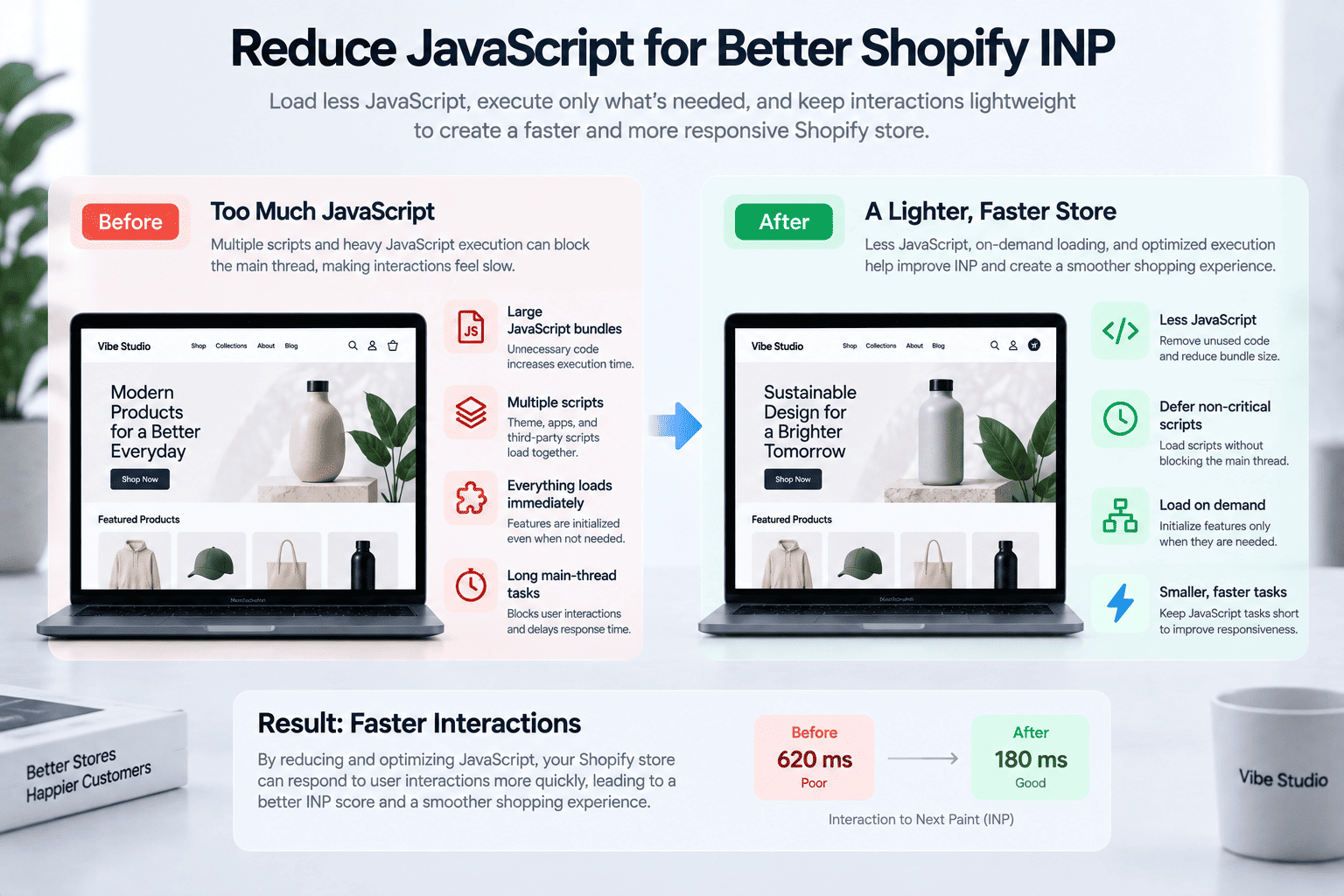
One of the most effective Shopify INP optimization strategies is to reduce unnecessary JavaScript execution.
The question should not only be:
How large is the JavaScript file?
A more useful question is:
How much JavaScript does the browser actually need to execute?
A relatively small JavaScript file can still create poor responsiveness if it performs expensive work at the wrong time.
Audit your theme for:
- Unused JavaScript
- Duplicate functionality
- Global event listeners
- Large initialization routines
- Repeated DOM queries
- Unnecessary calculations
- Features loaded on pages where they are not used
If a feature is only required on the product page, there is little reason to initialize its JavaScript on every page of the store.
Load JavaScript Only When It Is Needed
Not every feature needs to be initialized immediately.
Some functionality can be loaded when the customer actually interacts with it.
For example, consider a quick-view component.
Instead of loading all quick-view functionality during the initial page load, the theme can load the relevant JavaScript when the customer opens the quick view.
The same approach can work for:
- Advanced search
- Product comparison
- Size guides
- Reviews
- Video players
- Complex filters
- Interactive recommendation components
This approach reduces unnecessary work during the critical parts of the page lifecycle.
It can also prevent unrelated functionality from competing for the main thread when customers interact with the page.
Audit Shopify Apps and Third-Party Scripts
Third-party scripts are one of the biggest areas to investigate when working on Shopify INP optimization. Apps can add JavaScript that affects interaction responsiveness even when the app itself is not part of the interaction being measured.
Apps may add JavaScript for:
- Reviews
- Analytics
- Tracking
- Chat
- Wishlist
- Loyalty programs
- Product recommendations
- Popups
- Social feeds
- Advertising
- Personalization
The challenge is that merchants may install an app and forget that the app can continue loading scripts across the storefront.
Review the apps currently installed and ask:
- Is this app still being used?
- Does it inject JavaScript?
- Does it load on every page?
- Does it need to load immediately?
- Can the functionality be loaded only when needed?
- Can the feature be replaced with native theme functionality?
Removing one unnecessary app may be more valuable than optimizing several lines of theme code.
Use Defer and Async Correctly
Non-critical JavaScript should generally avoid blocking the browser unnecessarily.
Using defer can allow scripts to download without blocking HTML parsing while preserving execution order after the document has been parsed.
async can be useful for independent scripts that do not rely on a specific execution order.
However, these attributes are not magic performance switches.
A script that executes expensive work immediately after loading can still create main-thread contention.
The goal is not simply to add defer everywhere.
The goal is to ensure that non-critical JavaScript does not interfere with the work required for the customer to see and interact with the page.
Optimize Event Handlers for Better INP
Event handlers deserve special attention when working on INP.
An event handler can become expensive if it:
- Performs large calculations
- Modifies many DOM elements
- Forces layout calculations
- Triggers multiple components
- Performs unnecessary work
- Executes repeatedly during rapid interactions
For events such as scroll, resize, input, and mousemove, consider whether the handler should be throttled or debounced.
For example, a search field should not necessarily perform expensive operations on every individual keystroke.
Instead, the theme can wait briefly until the user pauses typing before performing certain work.
This reduces unnecessary processing and can make the interface feel considerably more responsive.
Break Up Long JavaScript Tasks
A long JavaScript task can block the browser from responding to user input.
Imagine a task that takes 300 milliseconds.
During that period, the browser may be unable to respond promptly to an interaction.
One strategy is to break large operations into smaller pieces.
For example:
function processItems(items) {
  const chunkSize = 20;

  function processChunk(start) {
    const end = Math.min(start + chunkSize, items.length);

    for (let i = start; i < end; i++) {
      processItem(items[i]);
    }

    if (end < items.length) {
      setTimeout(() => processChunk(end), 0);
    }
  }

  processChunk(0);
}
The exact implementation will depend on the feature, but the principle is important: avoid keeping the browser occupied with one unnecessarily long task.
Modern scheduling techniques can also help yield execution so that the browser gets opportunities to respond to user interactions.
Optimize Product Variant Selection for Shopify INP
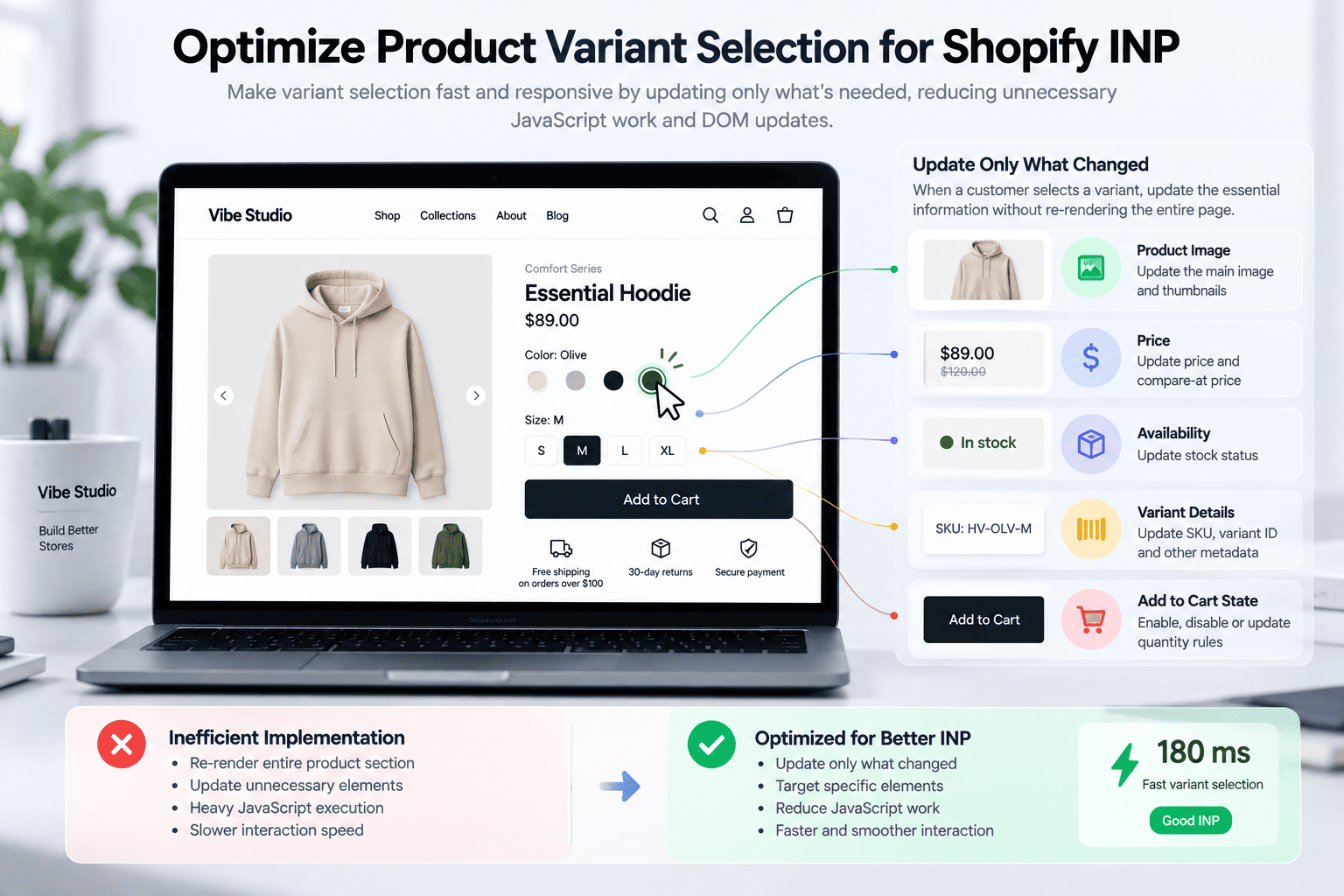
Variant selection is particularly important for Shopify stores because it often involves several UI updates.
A single click might trigger changes to:
- Product images
- Price
- Compare-at price
- Availability
- SKU
- Variant ID
- Add-to-cart state
- Quantity rules
- URL
- Product media
- Selling plans
A poorly structured implementation can perform far more work than necessary.
When optimizing variant selection, focus on making the interaction as targeted as possible.
Update Only What Changed
If selecting a color only changes the image and price, avoid rebuilding the entire product information area.
Target the specific elements that need updating.
Avoid Repeated DOM Queries
Repeated calls such as:
document.querySelector(...)
inside large interaction flows can add unnecessary work.
Cache frequently accessed elements where appropriate.
Keep Variant Data Manageable
Do not unnecessarily duplicate large objects or repeatedly transform the entire variant dataset during every click.
Prepare data once when possible.
Avoid Full Component Re-Renders
A small variant change should not require reconstructing a large portion of the page.
This is especially important for product pages with large galleries, recommendations, reviews, and other components.
Optimize the Cart Drawer
The cart drawer is another common INP hotspot.
A typical add-to-cart interaction may involve:
- Sending an AJAX request
- Receiving the updated cart
- Rendering cart contents
- Updating item quantities
- Updating totals
- Updating free-shipping progress
- Updating recommendations
- Updating cart counters
- Opening the drawer
- Running animations
If everything happens synchronously, the interaction can become expensive.
A better architecture separates essential work from secondary work.
The customer needs immediate confirmation that the product was added.
Secondary elements can be updated afterward when possible.
For example, a cart recommendation section should not necessarily block the core add-to-cart interaction.
Keep Mega Menus Lightweight
Mega menus often contain a surprising amount of HTML.
A navigation menu may include:
- Multiple columns
- Collection links
- Product images
- Promotional banners
- Brand logos
- Featured products
- Icons
- Nested navigation
If opening the menu causes the theme to calculate or modify a large number of elements, the interaction can become slower.
Consider:
- Keeping the menu DOM reasonably small
- Avoiding unnecessary JavaScript
- Using CSS for simple visibility changes
- Loading promotional content only when needed
- Avoiding expensive calculations when the menu opens
A simple menu interaction should remain simple.
Reduce DOM Complexity
JavaScript performance is only part of INP.
The browser also needs to calculate styles, layout, and rendering.
A very large or deeply nested DOM can make these operations more expensive.
Review your theme markup for unnecessary wrappers.
For example, this:
<div>
  <div>
    <div>
      <div>
        <button>Buy now</button>
      </div>
    </div>
  </div>
</div>
may sometimes be simplified without changing the visual result.
The goal is not to remove every <div>.
Instead, avoid adding structural complexity without a real purpose.
This is particularly valuable in:
- Product cards
- Mega menus
- Cart drawers
- Search results
- Recommendation sections
- Collection grids
Avoid Unnecessary Rendering
A common mistake is updating more of the page than the interaction requires.
Suppose a customer changes a quantity from 1 to 2.
The theme may only need to update:
- The line item quantity
- The line total
- The cart subtotal
- Potentially the shipping progress
There is no reason to rebuild unrelated sections.
More targeted updates generally require less browser work.
Reduce Stylesheet Complexity
CSS can also contribute to rendering costs.
A theme with many stylesheets and large amounts of unused CSS may require additional work from the browser.
Review:
- Number of CSS files
- Duplicate rules
- Unused styles
- Page-specific CSS
- Large component stylesheets
- CSS loaded globally but used only on one page
Where possible, keep page-specific resources scoped to the functionality that actually needs them.
This also makes the theme architecture easier to maintain.
Be Careful With Custom Elements
Custom elements can be an excellent architecture for Shopify themes.
They allow functionality to be encapsulated into reusable components such as:
<product-form></product-form>
or:
<quick-view></quick-view>
However, custom elements do not automatically make JavaScript fast.
A custom element can still:
- Execute expensive initialization
- Attach many event listeners
- Observe large portions of the DOM
- Perform unnecessary calculations
- Load additional resources
Use custom elements to organize functionality, but still profile what happens when the component initializes and when customers interact with it.
Do Not Confuse TBT With INP
Total Blocking Time (TBT) and INP are related, but they are not the same metric.
TBT is commonly used as a lab metric that helps identify long main-thread tasks.
INP focuses on real interaction responsiveness.
This means TBT can be useful during development, but it should not be treated as a direct replacement for field INP data.
A Shopify store can have a reasonable lab score while real customers still experience slow interactions.
That is why both lab diagnostics and real-user data are valuable.
How to Find the Worst INP Interactions
Do not optimize randomly.
First identify which interactions are actually slow.
Start by looking at real-user performance data where available.
Then reproduce problematic interactions manually.
Useful candidates include:
- Product variant selection
- Add to cart
- Cart quantity changes
- Search
- Collection filtering
- Mega menu opening
- Quick view
- Product image interactions
Chrome DevTools can help identify long tasks and reveal what JavaScript is doing during an interaction.
The goal is to answer three questions:
- What interaction is slow?
- What JavaScript runs when it happens?
- Which part of the interaction consumes the most time?
Once you have those answers, optimization becomes much more targeted.
A Practical Shopify INP Optimization Workflow
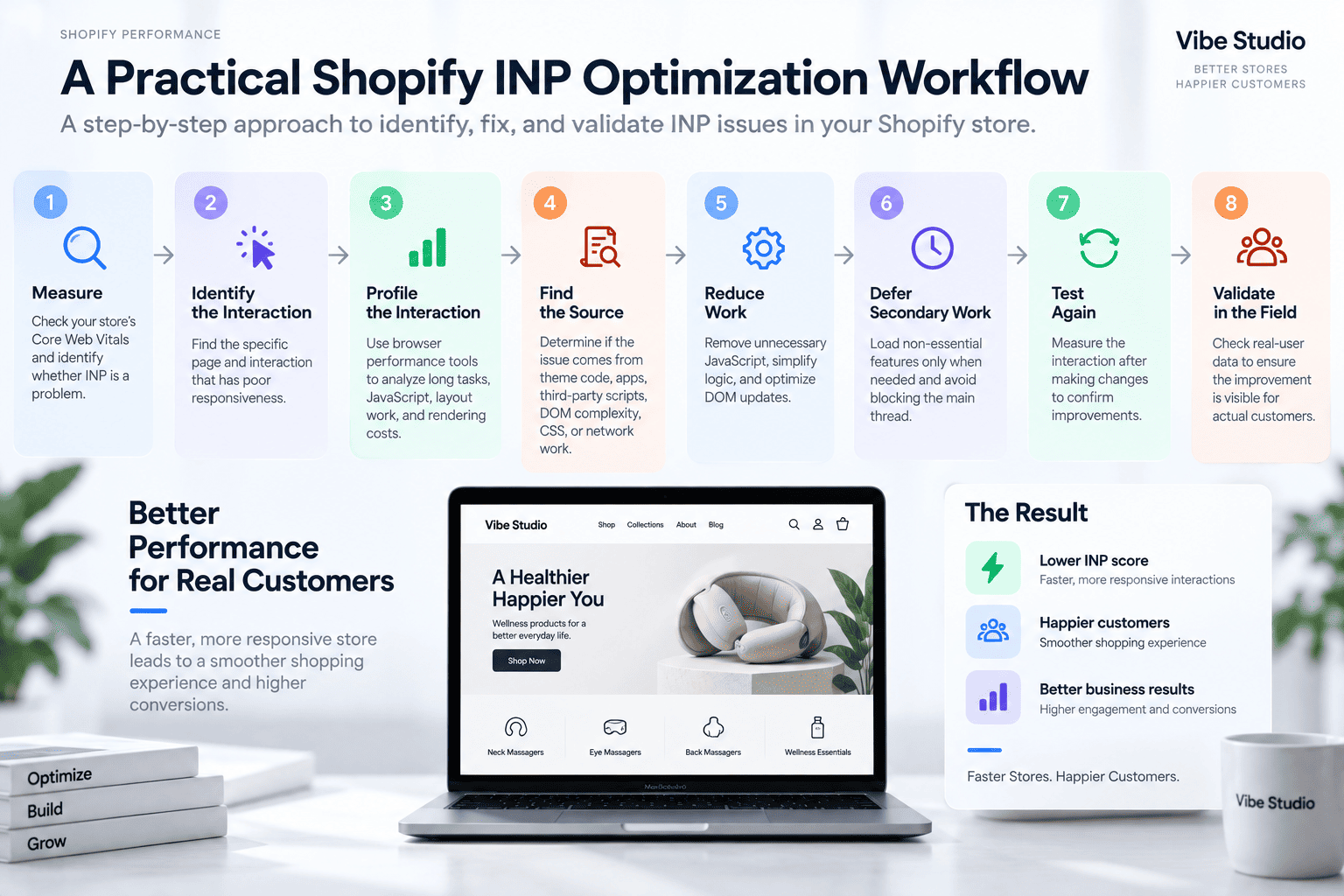
A structured Shopify INP optimization workflow is more effective than changing code based on guesswork. Instead of optimizing random parts of the theme, start by identifying the interactions that are actually slow and then work backward to find the cause.
Step 1: Measure
Check your store’s Core Web Vitals and identify whether INP is actually a problem.
Step 2: Identify the Interaction
Find the specific page and interaction associated with poor responsiveness.
Step 3: Profile the Interaction
Use browser performance tools to identify long tasks, expensive functions, layout work, and rendering costs.
Step 4: Find the Source
Determine whether the problem originates from:
- Theme JavaScript
- An app
- Third-party tracking
- DOM complexity
- CSS
- Network-related work
- Multiple components responding to the same event
Step 5: Reduce Work
Remove unnecessary processing before attempting more complicated optimizations.
Step 6: Defer Secondary Work
Move non-essential operations away from the critical interaction.
Step 7: Test Again
Measure the interaction again after the change.
Step 8: Validate in the Field
Confirm that the improvement is visible in real-user performance data rather than relying only on a local test.
How INP Relates to LCP and CLS
A fast Shopify store needs more than one good performance metric.
LCP
Largest Contentful Paint measures how quickly the main content becomes visible.
For Shopify, LCP can be affected by:
- Hero images
- Product images
- Video posters
- Render-blocking resources
- Server response time
- Theme structure
CLS
Cumulative Layout Shift measures unexpected movement of page content.
Common Shopify CLS problems include:
- Images without reserved dimensions
- Dynamic banners
- Late-loading fonts
- Injected app content
- Product media changing layout
INP
Interaction to Next Paint measures responsiveness after interaction.
Typical problems include:
- Heavy JavaScript
- Long tasks
- Slow event handlers
- Complex DOM updates
- App scripts
Together, these metrics provide a much better picture of storefront performance.
If you are considering a new theme as part of a performance improvement project, it is also worth evaluating the underlying feature set rather than looking only at visual design. Our guide to Premium Shopify Themes: Features, Benefits, and How to Choose One covers the factors that matter when comparing themes.
INP and Shopify Theme Architecture
Good INP performance starts with theme architecture.
A theme should not treat every feature as equally important.
A better approach is to separate functionality into different levels.
Critical Functionality
This includes interactions that customers use immediately, such as:
- Navigation
- Product selection
- Add to cart
- Cart controls
These should be lightweight and responsive.
Secondary Functionality
Examples include:
- Quick view
- Advanced filters
- Product recommendations
- Reviews
- Interactive guides
These features can often be initialized only when necessary.
Optional Functionality
Examples may include:
- Chat widgets
- Social feeds
- Additional tracking
- Promotional tools
These should not unnecessarily compete with core storefront interactions.
This architectural approach can improve both performance and maintainability.
Can a Premium Shopify Theme Have Poor INP?
Yes.
The price of a theme does not automatically determine its performance.
A premium theme can contain excellent architecture, but it can also include many features that add JavaScript and DOM complexity.
Likewise, a free theme can be fast while still lacking the features a growing store needs.
The important question is not simply:
Is this theme premium?
Instead, ask:
How efficiently does this theme implement the features my store actually needs?
When evaluating a theme, look at:
- JavaScript footprint
- Theme architecture
- App compatibility
- DOM complexity
- Feature loading strategy
- Mobile performance
- Core Web Vitals
- Customization quality
When Custom Shopify Development Makes Sense
Sometimes a store’s INP problems cannot be solved effectively by small theme tweaks.
Custom Shopify development can be useful when the store requires highly specialized functionality or when an existing theme architecture creates unnecessary complexity.
For example, a custom implementation may allow a developer to:
- Reduce unnecessary JavaScript
- Build lightweight interactive components
- Optimize variant selection
- Create more efficient cart interactions
- Load functionality conditionally
- Remove redundant dependencies
- Improve DOM structure
However, custom development is not automatically faster.
Poorly written custom code can create exactly the same problems.
If your store needs more extensive theme-level changes, our guide to Custom Shopify Development: Build a Store Around Your Business explains when custom development can make more sense than continually modifying an existing theme.
The objective should always be efficient architecture, not simply more custom code.
Shopify INP Optimization Should Start With the Biggest Problems
It is easy to spend hours making tiny JavaScript optimizations while a third-party app is injecting a large script into every page.
Prioritize improvements based on impact.
A practical order is:
- Remove unnecessary apps and scripts
- Identify long JavaScript tasks
- Optimize the slowest interactions
- Reduce unnecessary theme JavaScript
- Defer non-critical functionality
- Optimize DOM updates
- Improve event handlers
- Fine-tune rendering and CSS
This approach usually produces better results than trying to optimize every line of code.
Final Thoughts
Shopify INP optimization is about more than improving a Core Web Vitals score. It is about making your storefront feel fast and responsive when customers actually use it.
The biggest improvements often come from reducing unnecessary JavaScript, removing problematic third-party scripts, optimizing event handlers, simplifying DOM updates, and loading functionality only when it is needed.
Start with the interactions that matter most to customers. Product variant selection, add-to-cart, cart updates, search, filters, and navigation are often more important than optimizing an interaction that customers rarely use.
If your Shopify store has slow interactions, poor Core Web Vitals, or a theme that has become overloaded with apps and custom code, identifying the real cause can be difficult. Simply adding more optimization tools or changing a few scripts does not always solve the underlying problem.
If you need professional help with Shopify speed optimization, Core Web Vitals, JavaScript performance, or theme-level performance improvements, Vibe Studio provides Shopify speed optimization services tailored to your storefront.
If you would like to discuss your Shopify store and find out how we can help improve its speed and user experience, get in touch with our team.